
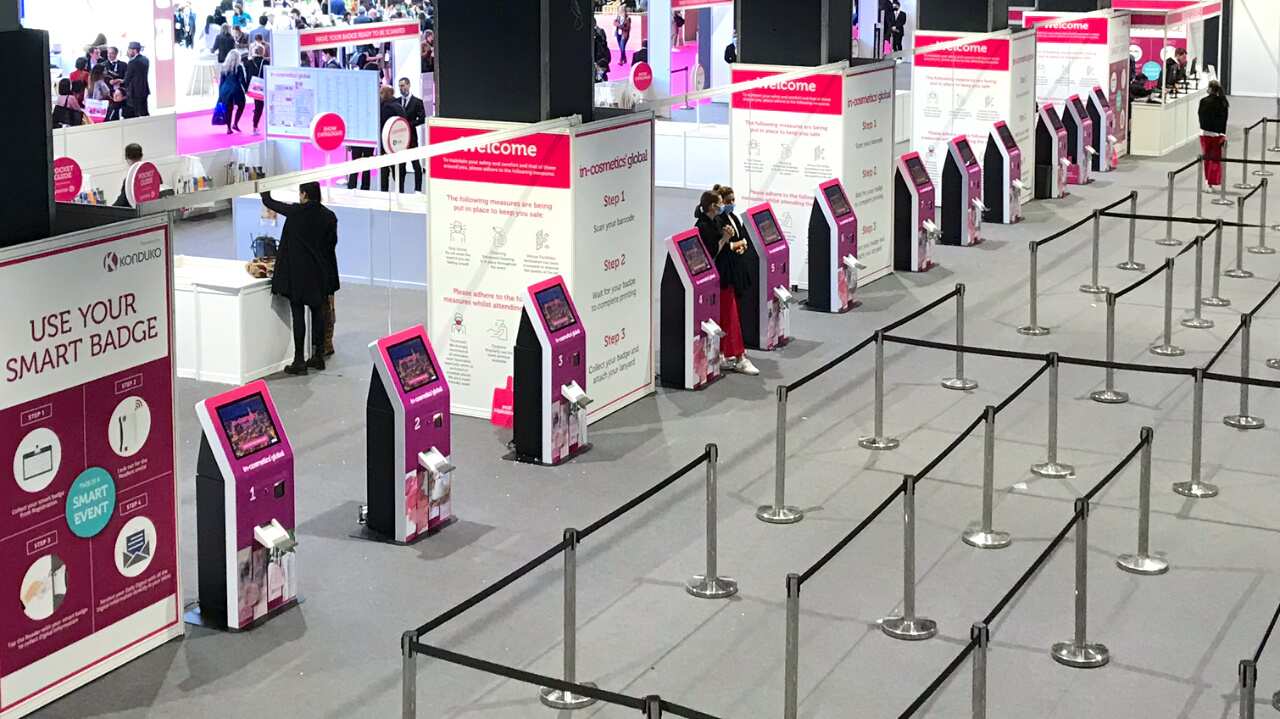
How attendee check-in sets the tone of your event
No one enjoys standing in line, especially at corporate events. But between collecting attendee information, handing out event materials, and managing last-minute registration issues, lines have a tendency to build up faster than we imagine.
Long wait times at check-in do more than frustrate guests. They can shape how people feel about the event before it has properly begun. A 2025 B2B events benchmark report1 found that 71% of attendees said ease of check-in could make or break their event experience.
That matters because organisers put a huge amount of time into planning the event experience. If the first touchpoint feels slow or disorganised, it can take the shine off everything that follows.
The good news is that this is one of the easiest pressure points to improve. With the right self-service event check-in kiosks in place, organisers can reduce queues, ease pressure on staff, and create a smoother arrival from the moment attendees walk through the door.
How self-service kiosks help prevent queue buildup
Queues rarely build for just one reason. They usually happen when too many small delays stack up at once, from manual badge handling to last-minute attendee changes and simple uncertainty at the registration desk.
Self-service kiosks help remove those friction points, making the arrival experience faster, smoother, and easier to manage for both attendees and onsite teams.
Grab your badge and go
Instead of sifting through piles of name badges and untangling lanyards, self-service kiosks allow attendees to scan, print, and receive their badges in moments. The trick here is to send reminder emails with the event QR code attached a few hours before the event to bump yourself to the top of their inbox. With the rise in last-minute attendees, that kind of preparation can make a noticeable difference at the front desk.
Eliminate manual errors
Misspelt names, incorrect colour coding, or last-minute attendee changes can snowball quickly, especially if attendees are being forced to the end of the line. Digital, self-service event kiosks allow amendments to be made instantly without any of the scrambling. This means there’s no longer any need to rush to the nearest printing shop or have attendees go through an entire event with the wrong name card.
Let staff and attendees focus on your main event
When registration runs more smoothly, your staff has more energy to provide that true VIP experience, whether it’s pointing attendees in the right direction or networking with key business partners. Faster check-in also gives your attendees more time to explore beyond the registration booth, leading to longer event dwell time and greater satisfaction.
Event check-in kiosk layout recommendations

Kiosk layouts will vary depending on your venue, floor plan, and event format. Still, a few practical guidelines can go a long way in helping your team manage queues more smoothly and keep arrivals moving.
General event registration guidelines
Some planning principles apply across almost every event size. Getting these basics right can make the registration process feel more inclusive, more organised, and much easier to navigate on the day.
- ADA-compliant lane2 for wheelchair users and attendees who may need additional support.
- Position badge holders and lanyards after kiosk stations to avoid bottlenecks at the point of check-in.
- Encourage staff and exhibitors to collect their badges before the event (e.g. during setup days) so that you can dedicate 100% of your attention to attendees on opening day.
- Consider adding a dedicated check-in station for groups if you anticipate many large teams arriving.
- Consider adding VIP stations for important guests who need priority.
Number of kiosks per event size
While the right number of kiosks will depend on your event format, arrival patterns, and venue layout, planners often start by looking at the peak arrival window rather than total attendance.
A useful planning guide is to estimate how many attendees are likely to arrive during the busiest hour, then divide that figure by a realistic per-kiosk throughput rate under live event conditions.
Peak hour arrivals ÷ 140 = estimated number of kiosks
This does not refer to printer speed alone. In practice, time needs to be allowed for each attendee to approach the terminal, scan or search, confirm their details, print their badge, and clear the kiosk for the next person. While the technology and printers may support higher speeds, real-world throughput is shaped by the full attendee interaction at each terminal.
For example, if 70% of 1,000 attendees are expected to arrive between 08:00 and 09:00 on day one, that would mean planning for 700 arrivals in the busiest hour. Dividing 700 by 140 gives an estimated requirement of five kiosks.
It is also possible to gauge the number of kiosks required based on the general event size:
- Small events (<300 attendees): Two to four kiosks, ideally aligned against a wall or railing where possible. Have a greeter nearby to guide arrivals and answer quick questions.
- Medium events (between 300-1,000 attendees): Four to eight kiosks, arranged in two clear lanes. All cables should be kept tucked away, with directional signage to help attendees move through the space.
- Large events (>1,000 attendees): Starting with ten kiosks, with an additional kiosk for every additional 140 to 150 expected attendees. Kiosks should be arranged in L-shaped or U-shaped formations, which can work well here, especially when entry and exit paths are clearly marked.
Staffing and roles
Even with a strong kiosk setup in place, human coordination still plays an important role on event day. When arrivals move quickly, staff can focus on guiding attendees, resolving issues early, and preventing unnecessary queues.
- Greeters: Around one greeter between every two to three kiosks to quickly answer any attendee questions and direct guests to the right place.
- Flow managers: One per zone to monitor queues, support traffic flow, and respond to printer or kiosk issues if they arise.
- Exception desk staff: Depending on the tone of your event, it is recommended to have one or two per 500 attendees to help manage badge reprints, name changes, and other last-minute registration issues without holding up the main queue.
Smooth check-ins for a better event arrival experience
Large events put real pressure on the registration experience, especially when organisers need to move people through quickly without losing accuracy or flexibility. That is why a well-planned check-in process matters so much. It shapes first impressions, eases pressure on onsite teams, and helps the day start on the right foot.
At TCS Summit Europe, organisers reported a faster, smoother, and more flexible onsite registration experience with digital check-in and badge printing in place. The setup also allowed mistakes to be corrected instantly during check-in, helping the team respond more quickly to changes on the day.
As Luca De Giuseppe, Head of Digital, Campaigns, and Tools for Europe and the UK at TCS, put it:
“When you’re engaging with C-Suite level attendees, even small improvements can make a big difference. As the first impression, we want check-ins to be 100% smooth. Working with Klay for several years now, they have become a trusted partner for badge printing for our biggest flagship event in Europe.”
Better event arrivals start with better event planning
Your event check-in process does more than move people through the door. It sets the pace for the day, shapes first impressions, and influences how smoothly everything runs from that point on. When queues are reduced, staff are better supported, and attendees can get where they need to be without delay, the whole event starts in a stronger position.
Self-service kiosks can play a major role in that, but the real difference comes from how the entire arrival experience is planned. From layout and staffing to badge printing and last-minute changes, small operational decisions can have a big impact once guests begin to arrive.

Make queues and confusion a thing of the past
Feel the difference with Klay Event Technology’s event check-in kiosks.
Event check-in kiosk FAQs
An event check-in kiosk is a self-service station that allows attendees to register, scan a QR code, print a badge, and check in quickly upon arrival at an event.
They reduce queues by speeding up badge printing, reducing manual processing, and helping organisers manage arrivals more efficiently during busy check-in periods.
Yes. Event check-in kiosks are especially useful for large events where many attendees arrive in a short time, and organisers need to manage the flow without long delays.
Yes. Digital event kiosk setups can support last-minute badge reprints, name corrections, and other attendee changes without slowing down the main registration queue.
That depends on your event size, layout, and expected arrival peaks. The right setup will vary, but planning for busy check-in windows is key to avoiding bottlenecks.
No. They reduce manual workload, but onsite staff still play an important role in guiding attendees, managing exceptions, and keeping the arrival experience running smoothly.
References: